Terraform Infrastructure
Enterprise-Grade Azure Multi-Environment IaC
Overview
This Terraform configuration deploys a complete, production-ready infrastructure on Microsoft Azure. Our Infrastructure as Code (IaC) approach enables automated, repeatable, and consistent deployments across multiple environments (Dev, QA, UAT, Production).
Multi-Environment
Separate configurations for Dev, QA, UAT, and Production with complete isolation
State Management
Remote state in Azure Blob Storage with automatic locking and encryption
Modular Design
Reusable modules for all resources ensuring consistency and maintainability
Security First
Credentials via GitHub Secrets, NSG rules, and private network isolation
Infrastructure Architecture
Our infrastructure follows a hub-and-spoke architecture with complete isolation between environments. Each environment contains its own Resource Group, Virtual Network, Storage Account, and Virtual Machines.
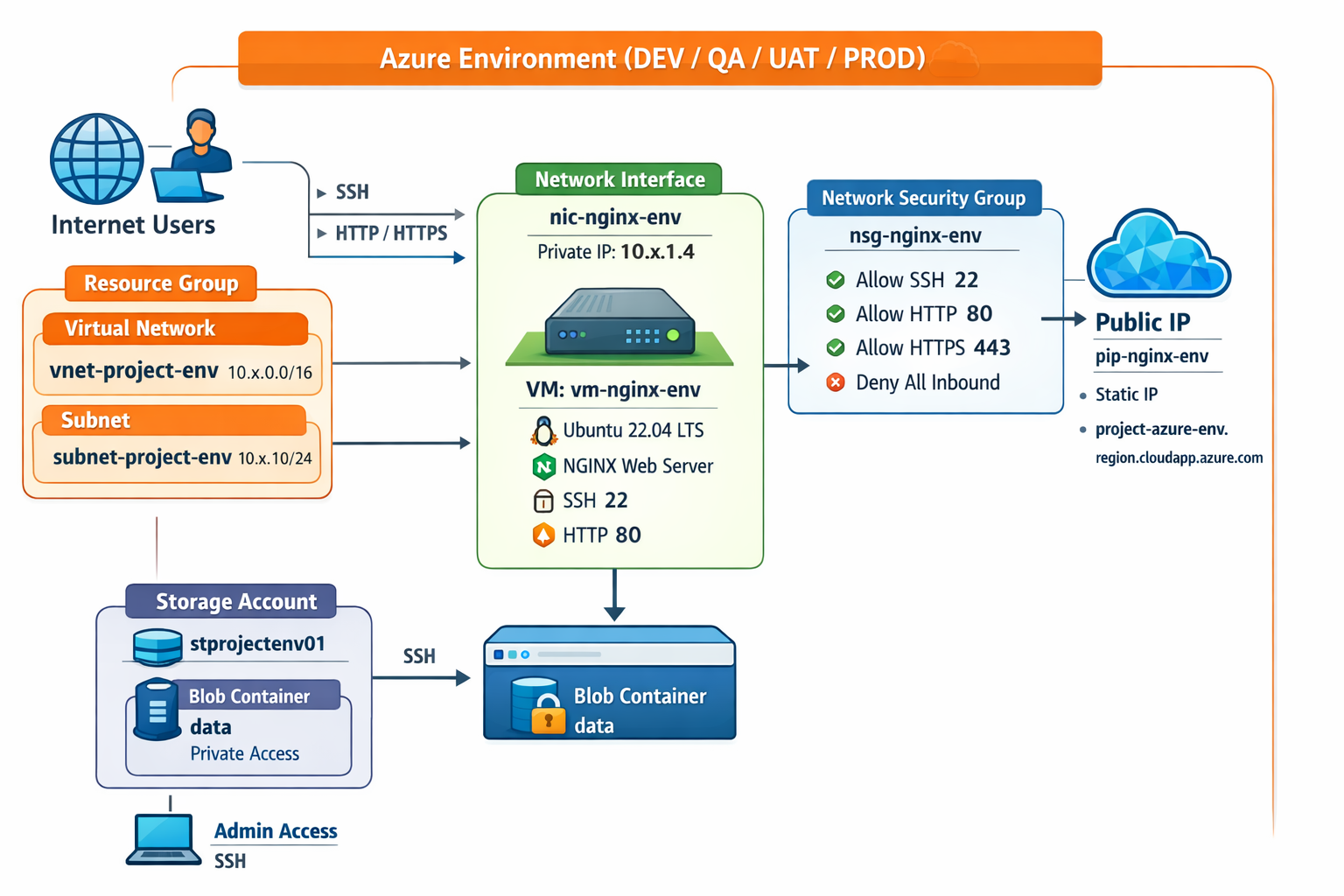
Multi-Environment Azure Infrastructure - Complete Isolation
Architecture Highlights
- Resource Group: Logical container for all environment resources
- Virtual Network (VNet): Isolated network per environment (10.x.0.0/16)
- Subnet: Network segment for VMs (10.x.1.0/24)
- Network Security Group (NSG): Firewall rules (SSH, HTTP, HTTPS)
- Public IP: Static IP with custom DNS label
- Virtual Machine: Ubuntu 22.04 LTS with NGINX
- Storage Account: Blob storage for application data
Infrastructure Components
1. Resource Group
Purpose: Logical container that holds related Azure resources for easy management, billing, and lifecycle control.
Example Names: rg-swarup-dev, rg-swarup-prod
2. Storage Account
Purpose: Cloud storage for files, blobs, and application data with encryption at rest and versioning enabled.
- DEV: LRS replication (Locally Redundant Storage)
- PROD: GRS replication (Geo-Redundant Storage)
- HTTPS-only, private access, automatic backups
3. Virtual Network (VNet)
Purpose: Private network in Azure with custom IP addressing, completely isolated from other environments.
| Environment | VNet Address Space | Subnet Range |
|---|---|---|
| DEV | 10.0.0.0/16 |
10.0.1.0/24 |
| QA | 10.1.0.0/16 |
10.1.1.0/24 |
| UAT | 10.2.0.0/16 |
10.2.1.0/24 |
| PROD | 10.3.0.0/16 |
10.3.1.0/24 |
4. Network Security Group (NSG)
Purpose: Firewall rules that control inbound and outbound network traffic to protect VMs.
| Priority | Name | Port | Protocol | Action |
|---|---|---|---|---|
| 100 | AllowSSH | 22 | TCP | Allow |
| 110 | AllowHTTP | 80 | TCP | Allow |
| 120 | AllowHTTPS | 443 | TCP | Allow |
| 65000 | DenyAllInbound | * | * | Deny |
5. Virtual Machine
Purpose: Linux virtual server running Ubuntu 22.04 LTS with NGINX web server for hosting applications.
| Environment | VM Size | vCPUs | RAM | Cost/Month |
|---|---|---|---|---|
| DEV | Standard_B1s | 1 | 1 GB | ~$10 |
| QA | Standard_B1s | 1 | 1 GB | ~$10 |
| UAT | Standard_B2s | 2 | 4 GB | ~$25 |
| PROD | Standard_B2s | 2 | 4 GB | ~$50 |
Terraform Project Structure
Our Terraform project follows best practices with a modular architecture that promotes reusability, maintainability, and scalability.
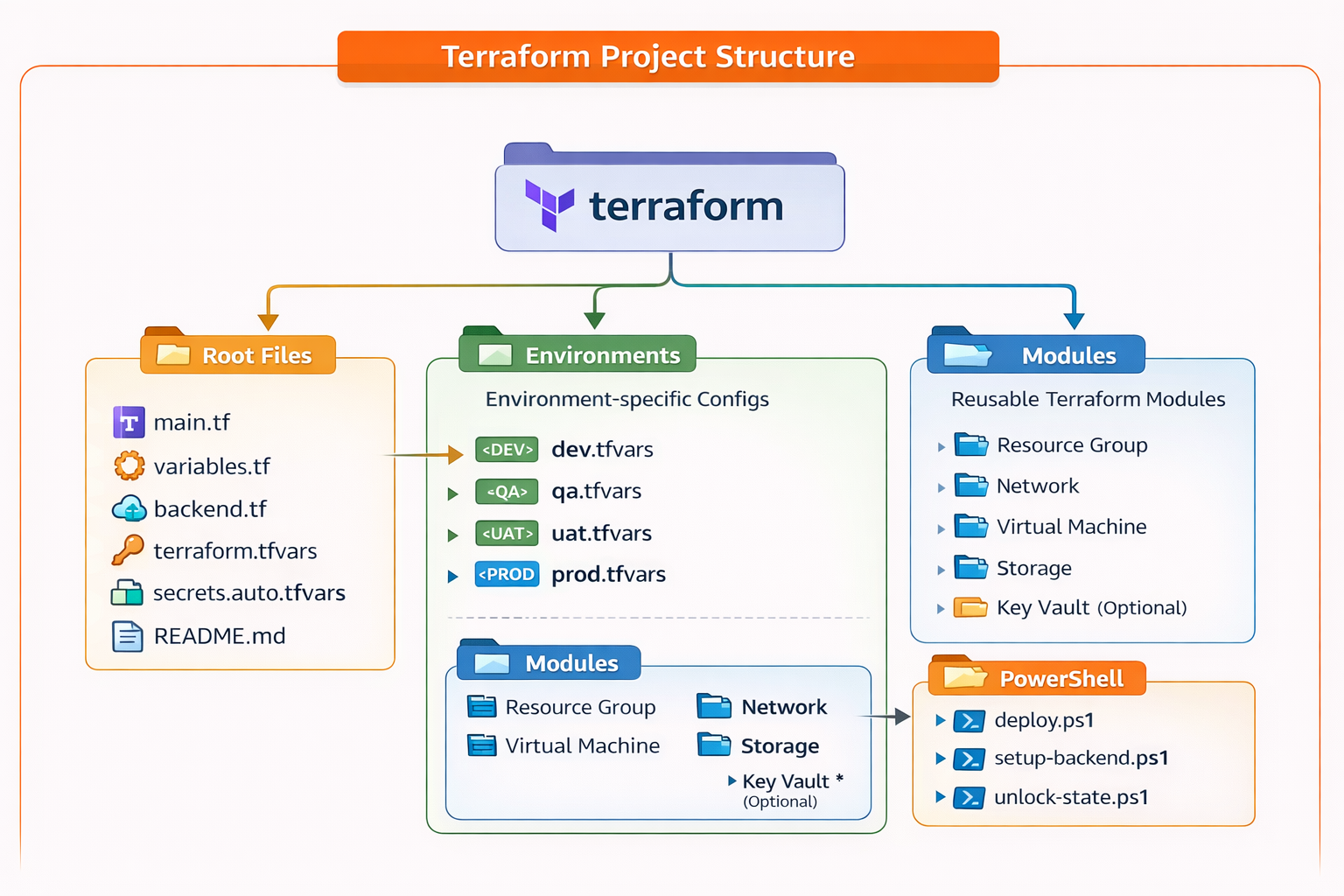
Modular Terraform Project Structure
Project Organization
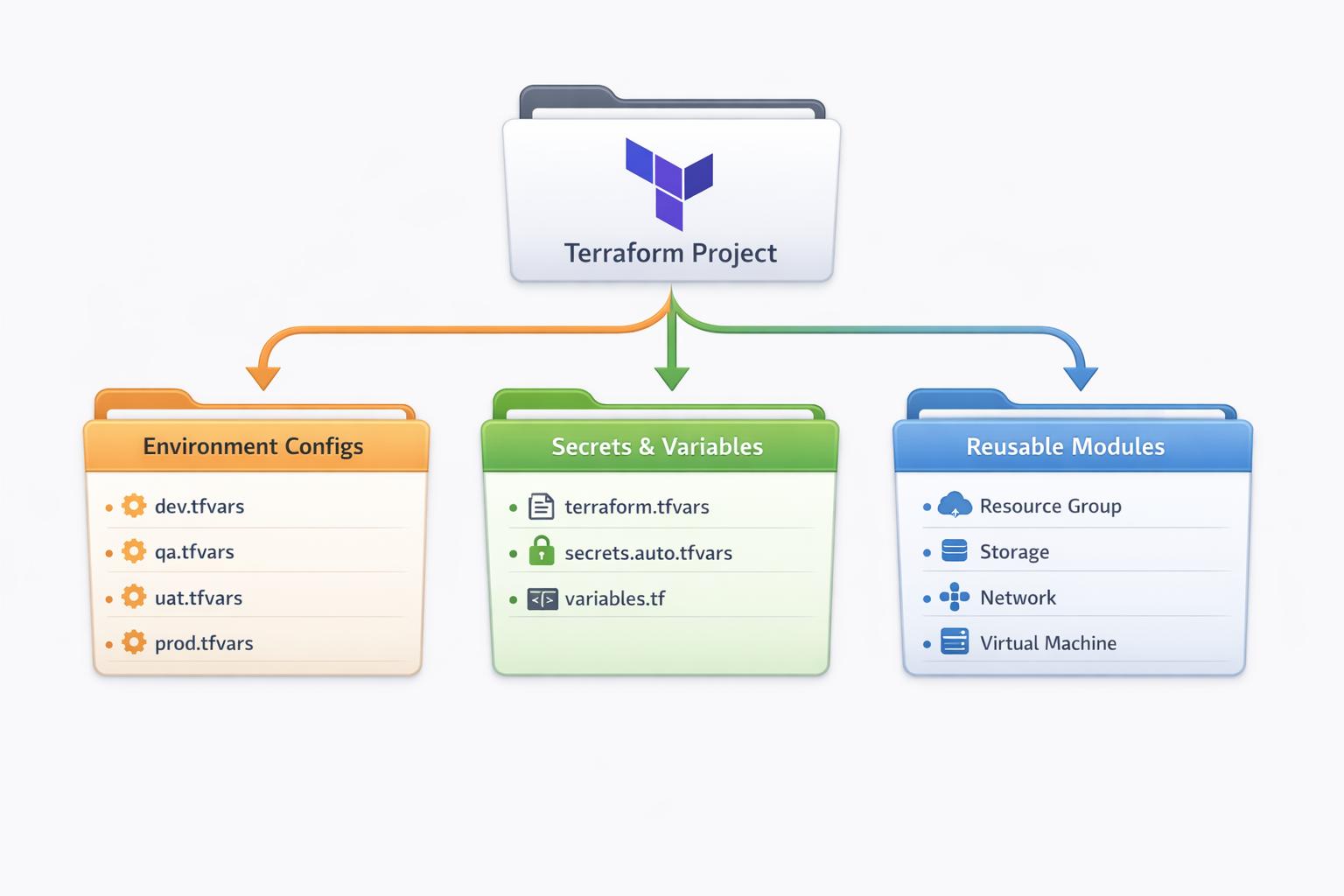
Terraform Project Organization - File Structure & Module Layout
Module Architecture
Each module is self-contained with three key files:
main.tf- Resource definitionsvariables.tf- Input variablesoutputs.tf- Output values for other modules
Why Modular?
- Reusability: Write once, use everywhere
- Maintainability: Change in one place updates all
- Testing: Test modules independently
- Organization: Logical grouping of resources
- Scalability: Easy to add new environments or regions
State Management
Remote State Backend
Terraform state files are stored in Azure Blob Storage instead of local disk. This enables team collaboration, state locking, and disaster recovery.
Team Collaboration
Shared state accessible by entire team
State Locking
Prevents concurrent modifications using Azure blob leases
Encryption
State data encrypted at rest in Azure
Version History
Track changes and rollback if needed
State File Organization
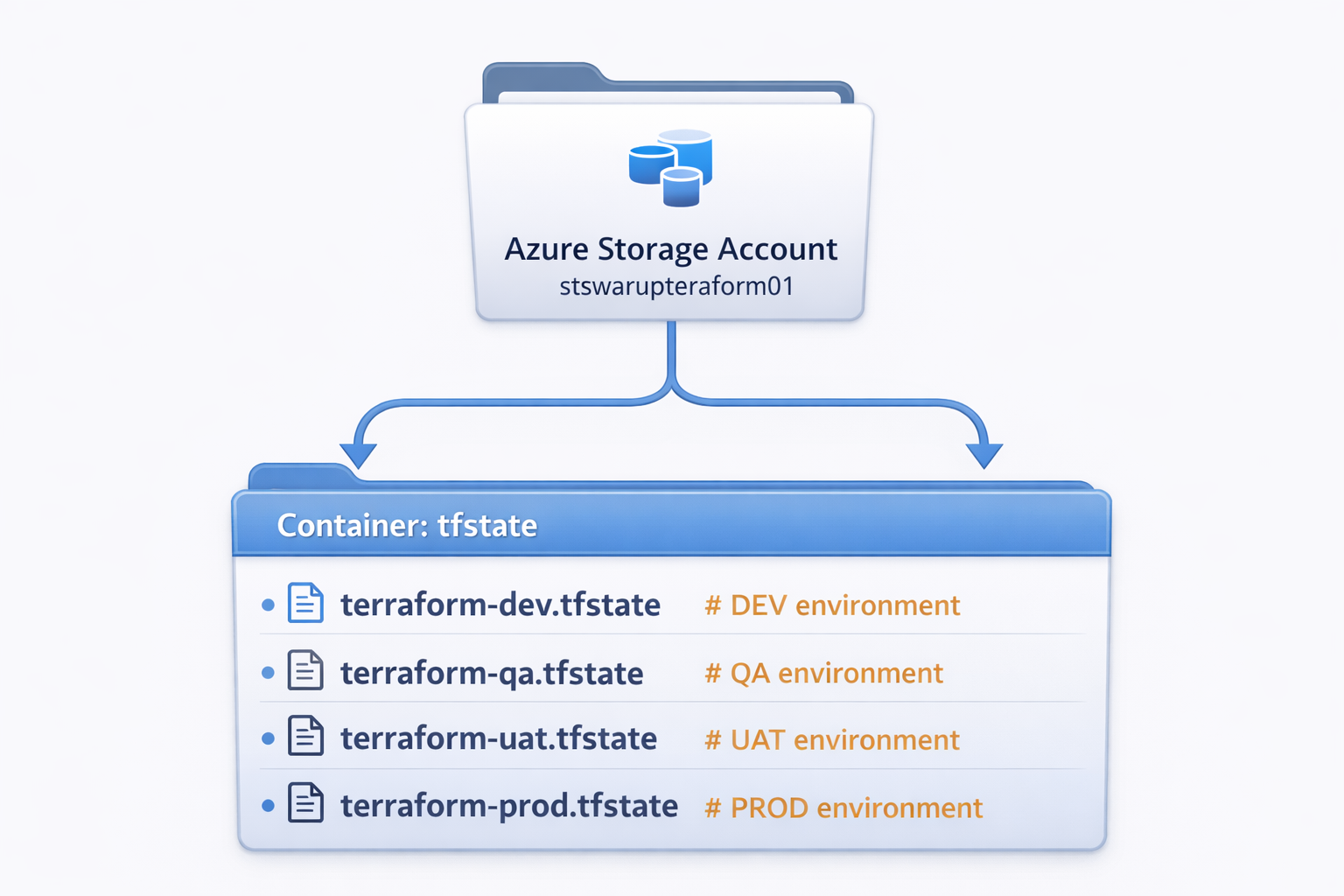
Azure Blob Storage - Environment State File Organization
State Locking: Azure uses blob lease mechanism to lock state during terraform apply or terraform destroy, preventing concurrent modifications that could corrupt state.
Environment-Specific Variables
Environment-specific configuration is managed through .tfvars files.
Same code, different values = different environments!
Variable Hierarchy
Terraform loads variables in this order (later overrides earlier):
- Default values in
variables.tf - Environment variables (
TF_VAR_*) terraform.tfvars(common values)secrets.auto.tfvars(gitignored secrets)environments/*.tfvars(environment-specific)
Variable Comparison
| Variable | DEV | QA | UAT | PROD |
|---|---|---|---|---|
| vm_size | Standard_B1s |
Standard_B1s |
Standard_B2s |
Standard_B2s |
| storage_replication | LRS |
LRS |
GRS |
GRS |
| vnet_address | 10.0.0.0/16 |
10.1.0.0/16 |
10.2.0.0/16 |
10.3.0.0/16 |
| resource_group | rg-swarup-dev |
rg-swarup-qa |
rg-swarup-uat |
rg-swarup-prod |
🚀 Deployment Commands - Multiple Options
Quick Deployment Options
Option 1: Environment-Specific Deployment
# Deploy to DEV environment
terraform apply -var-file="environments/dev.tfvars"

# Deploy to QA environment
terraform apply -var-file="environments/qa.tfvars"

# Deploy to UAT environment
terraform apply -var-file="environments/uat.tfvars"

# Deploy to PRODUCTION environment
terraform apply -var-file="environments/prod.tfvars"
Option 2: PowerShell Automated Deployment
# Deploy Infrastructure
.\terraform\powershell\deploy.ps1 -Environment dev -Action apply

# Destroy Infrastructure
.\terraform\powershell\deploy.ps1 -Environment dev -Action destroy

# Plan Only (Review Changes)
.\terraform\powershell\deploy.ps1 -Environment prod -Action plan
Option 3: Direct Terraform CLI Commands
# Initialize Terraform with Backend
terraform init -backend-config="key=terraform-dev.tfstate"

# Validate Configuration
terraform validate

# Format Code
terraform fmt -recursive

# Plan Changes
terraform plan -var-file="environments/dev.tfvars" -out=tfplan

# Apply with Plan File
terraform apply tfplan

# Apply with Auto-Approve (Careful!)
terraform apply -var-file="environments/dev.tfvars" -auto-approve

# Show Current State
terraform show

# List All Resources
terraform state list

# Destroy Everything
terraform destroy -var-file="environments/dev.tfvars"
Option 4: GitHub Actions (CI/CD Pipeline)
# Trigger via GitHub UI:
# 1. Go to Actions tab
# 2. Select "Deploy Infrastructure" workflow
# 3. Click "Run workflow"
# 4. Select environment (dev/qa/uat/prod)
# 5. Choose action (apply/destroy)
# 6. Click "Run workflow"

# Automatic trigger on push to main:
git add .
git commit -m "Update infrastructure"
git push origin main
Option 5: Web Dashboard Deployment
# Access Web Dashboard:
# 1. Open: https://your-website.azurewebsites.net/Terraform.html
# 2. Click "Deploy Infrastructure" button
# 3. Select Environment (DEV/QA/UAT/PROD)
# 4. Enter Security PIN
# 5. Click "Deploy Now"
# 6. Monitor progress in real-time
Local Development
Use Terraform CLI or PowerShell scripts for rapid testing and iteration
CI/CD Automation
GitHub Actions for automated, reviewed, and audited deployments
Web Interface
Dashboard for non-technical users with PIN protection
Production Safety
Always use plan before apply, require approvals for PROD
GitHub Secrets Authentication
Sensitive credentials (VM passwords, Azure credentials) are never stored in code. Instead, they're securely managed through GitHub Secrets and injected at deployment time.
Authentication Flow
- GitHub Secrets: Credentials stored encrypted in GitHub repository settings
- Workflow Environment Variables: GitHub Actions reads secrets and sets
TF_VAR_*variables - Terraform Variables: Terraform reads environment variables automatically
- Azure Resources: Credentials used to create VMs, never exposed in logs
Required GitHub Secrets
| Secret Name | Purpose | Used In |
|---|---|---|
AZURE_CLIENT_ID |
Azure Service Principal ID | OIDC Authentication |
AZURE_TENANT_ID |
Azure AD Tenant ID | OIDC Authentication |
AZURE_SUBSCRIPTION_ID |
Azure Subscription ID | OIDC Authentication |
VM_ADMIN_USERNAME |
VM Administrator Username | VM Creation |
VM_ADMIN_PASSWORD |
VM Administrator Password | VM Creation |
OIDC Authentication (Modern & Secure)
We use OpenID Connect (OIDC) instead of storing long-lived Azure credentials. GitHub generates short-lived JWT tokens that Azure validates, eliminating the need for stored secrets.
Security Benefits
- No passwords stored: OIDC uses temporary tokens
- Short-lived credentials: Tokens expire after workflow
- Secret masking: GitHub masks secrets in logs (shown as ***)
- Environment protection: PROD requires approvals
- Audit trail: All deployments logged in GitHub
Deployment Process
Deployment Options
PowerShell Script
Local deployment with automated commands
GitHub Actions
CI/CD pipeline with environment protection
Web Dashboard
Visual interface with PIN protection
Terraform CLI
Direct command-line execution
Deployment Steps
- Initialize Backend:
terraform init -backend-config="key=terraform-dev.tfstate" - Validate Config:
terraform validate - Plan Changes:
terraform plan -var-file="environments/dev.tfvars" - Apply Changes:
terraform apply -var-file="environments/dev.tfvars" - Verify Outputs:
terraform output
Infrastructure Deployment Time: First deployment takes ~5-8 minutes. Subsequent updates take 2-3 minutes depending on changes.
Best Practices
Modular Design
Use modules for reusability and maintainability. Each module should have a single responsibility.
Remote State
Always use remote state for team collaboration with proper locking mechanism.
Secret Management
Never commit secrets to git. Use GitHub Secrets or Azure Key Vault.
Resource Tagging
Tag all resources with environment, owner, and cost center for tracking.
Plan Before Apply
Always run terraform plan and review changes before applying.
Version Control
Keep all Terraform code in Git with meaningful commit messages.
Cost Optimization
- Use B-series VMs for non-production environments
- Enable auto-shutdown for dev/qa VMs outside business hours
- Use LRS storage for dev, GRS only for production
- Delete unused resources regularly
- Monitor costs with Azure Cost Management